

Integrations let you pull your existing reviews from the platforms where customers already leave them — Google, Tripadvisor, The Dyrt, Airbnb, Yelp, Vrbo and Booking.com — into one place. Your Google and Tripadvisor reviews can also be shown on your website; reviews from the other platforms stay inside your dashboard for replies and stats. Once connected, your reviews are imported automatically and refreshed regularly, so you can showcase them on your website and widgets and manage them from a single dashboard.
Important: connecting a platform is done by pasting your public listing link (or, for Google, searching for your business). SocialBizHub does not ask for your Airbnb or other platform passwords.
Accessing Integrations
- Log in to your SocialBizHub account.
- Go to Integrations from your Dashboard.
- Use the location switcher to choose which location you're connecting (or add a location first if you don't have one yet).
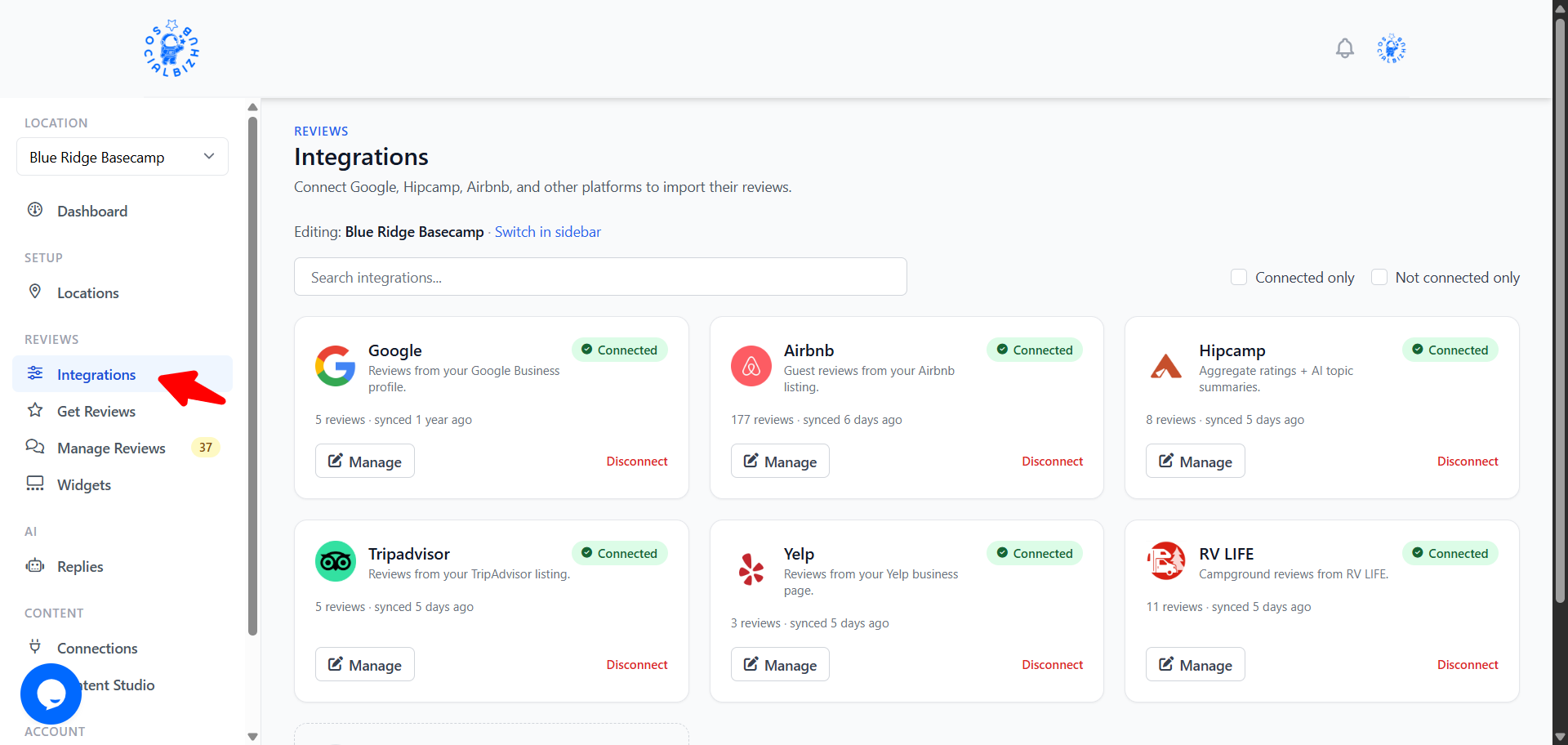
What you'll see depends on your plan. On Starter, only Google is available. Growth and Pro unlock Tripadvisor, The Dyrt, Airbnb, Yelp, Vrbo, and Booking.com. See Plans & Billing for the full comparison.
Available integrations
Connecting Google imports your Google Business reviews.
- Click Integrate on the Google card.
- In the dialog, start typing your business name in the Search for a Place field and select your business from the suggestions.
- Click Save Place.
Your Google reviews will begin importing shortly.
Want SocialBizHub to also post AI‑assisted replies to your Google reviews? That's a separate, more powerful connection — see the AI Review Replies article.
Already connected Google for replies? If you've linked your Google Business Profile on the AI Review Replies page, the Google card here shows as Connected automatically — there's nothing extra to do, and your review request page will send customers to your Google listing. You manage that connection from AI Review Replies.
Tripadvisor, The Dyrt, Airbnb, Yelp, Vrbo & Booking.com
These platforms connect the same way — by pasting your public listing URL:
- Click Integrate on the platform's card.
- Paste the full URL of your public listing page into the Listing URL
field. Each card shows an example of the correct link format. A few tips:
- Tripadvisor — use your full listing page URL (it contains a
-dfollowed by a number, e.g.…-d647046-Reviews-…). - Yelp — use your business page URL (e.g.
yelp.com/biz/your-business). - The Dyrt — use your campground page URL on
thedyrt.com. - Vrbo — use your property page URL on
vrbo.com. - Booking.com — use your property page URL on
booking.com.
- Tripadvisor — use your full listing page URL (it contains a
- Click Save.
Reviews are imported automatically after you save.
Hipcamp, RV LIFE and Campendium (retired 2026-09-06): we no longer import from these platforms. Claim your page on each one and turn on their review notifications; reply there directly. Any reviews imported earlier stay visible in your dashboard.> feedback rather than individual review text. SocialBizHub imports this as a rating + AI-summary block, not individual guest reviews.
Managing integrations
- A connected platform's card shows a checkmark and an Edit button.
- To disconnect, click Edit, then Delete. This removes the connection and the reviews that were imported from that platform for the location.
- Google connected through your Google Business Profile shows as connected here but is managed from AI Review Replies — use that page to disconnect it.
- Occasionally a platform may show Scheduled Maintenance — this means imports for that platform are temporarily paused while we make improvements.
How often are reviews updated?
After you connect a platform, an initial import runs within a few moments. After that, SocialBizHub re‑checks your connected platforms on a regular schedule and brings in new reviews automatically.
Suggest a new integration
Don't see the platform you need? Scroll to Suggest an integration on the Integrations page (or search for "suggest") and click Send suggestion. Tell us the platform name, an example listing URL, and any notes. We use this feedback to prioritize new connectors — it does not connect the platform automatically.
Frequently asked questions
Do I need to give SocialBizHub my Airbnb password? No. You only paste your public listing link. We read your publicly visible reviews — we never ask for platform login credentials.
Can I connect more than one location? Yes. Switch locations using the sidebar location switcher and connect each one to its own platforms.
What happens to imported reviews if I disconnect a platform? Reviews that were imported from that platform for the location are removed. The reviews on the platform itself are not affected. (Exception: if your Google reviews come in through a connected Google Business Profile, they stay put — that connection is managed from AI Review Replies, not here.)
Can I connect more than one platform at the same time? Yes — connect as many of the available platforms as you like for each location.
Can these review connections "expire" like a social account? No. The connections on this page use your public listing links, so there is no sign-in that can lapse. Social posting accounts (Facebook, Instagram, etc.) work differently — see Keeping your social accounts connected.